- Home Page /
- Books /
- Computers & Technology /
- Operating Systems /
- Windows /
- Windows Desktop /
- Windows 10 /
- Windows 10 Introduction Quick Reference Guide...


Item #:
15451465
Windows 10 Introduction Quick Reference Guide (Cheat Sheet of Instructions, Tips & Shortcuts - Laminated) Updated May 2021 Pamphlet August 17, 2018
Item #:
15451465
BAM 25
Price Details
Excluding Shipping & Custom charges ( Shipping and custom charges will be calculated on checkout )
*All items will import from US
In stock
 Imported from USA store
QTY:
Only 4 items left in stock.
Order now and get it around Wednesday, June 24
Secured transaction
Ubuy works hard to protect your security and privacy. Our advanced payment security system ensures confidentiality by encrypting your information during transmission using AES (Advanced Encryption Standards) and SSL (Secure Socket Layer) protocols. Your payment details are 100% secure as we do not share your payment details with third party sellers.
Our Top Logistics Partners


Four-page laminated Windows 10 quick reference guide with step-by-step instructions and shortcuts for any type of user

Fast
Shipping

Free
Return*

Secure Packaging

100% Original Products

PCI DSS Compliance

ISO 27001 Certified


Note: Step Down Voltage Transformer required for using electronics products of US store (110-120). Recommended power converters Buy Now.


What Stands Out
Laminated Durability
This guide is laminated, ensuring protection against wear and tear, making it ideal for frequent use without fading, tearing, or spilling damage during your Windows 10 navigation.
Quick Tips & Shortcuts
Provides concise instructions, essential tips, and keyboard shortcuts, allowing users to boost productivity and navigate Windows 10 efficiently, catering to both beginners and experienced users.
Easy Reference Format
Designed as a quick reference guide, it presents information in an easily digestible format, enabling users to find solutions swiftly, streamlining their experience with Windows 10.
Product Details
- Updated May 2021, four page laminated quick reference guide showing step-by-step instructions and shortcuts for how to use Microsoft Windows 10. Includes touch interface. This guide is suitable as a training handout, or simply an easy to use reference guide, for any type of user. The following topics are covered: Getting Started: Starting Windows; Ending your Windows session. Accessing Apps and Content (Start Menu): Configuring the Start Menu; Resizing the Start Menu; Pinning an App to Start; Rearranging and Resizing App Tiles; Managing Tile Groups. Accessing Apps and Notifications (Taskbar): Configuring the Taskbar; Pinning an App to the Taskbar; Using Taskbar Jump Lists; Using the Action Center. Working with Apps: Starting an App; Opening an App File (Document); Saving an App File; Switching Between Apps/Windows; Switch Using Task View; Snapping Multiple Apps to the Same Screen; Resizing an App; Moving an App; Maximizing an App; Restoring to Previous Size; Hiding an App; Closing an App; Close an app window from the Taskbar; Searching for Apps; Searching with Cortana; Working with Multiple Desktops. Managing Content with File Explorer: Managing Files and Folders with File Explorer; Customizing the Quick Access Toolbar; Navigating in File Explorer; Customizing the Default Quick Access View; Searching in File Explorer; Refine Your Search; Changing File Explorer's Display; Grouping and Sorting Files and Folders; Opening a Second Explorer Window; Creating a Folder; Renaming Files or Folders; Selecting Multiple Items; Selecting Items with Checkboxes; Moving and Copying Files and Folders; Using Cut, Copy & Paste for files; Deleting Files or Folders; Restoring Deleted Items; Deleting Permanently; Linking to a Document, Folder, or App; Sending Files and Folders (Zip); Unzipping (Extracting) Files; Working with Libraries. Working in Tablet Mode: Configuring Tablet Mode; Using Tablet Mode. Settings & Troubleshooting: Using the Settings App; Adding a Picture or Slide Show to Your Lock Screen; Setting Up WiFi; Using Airplane Mode; Using the Control Panel App; What to Try if an App Freezes; Getting Help. Users & Security: Changing Users; Adding User Sign-Ins; Configuring Sign-In. Also includes a Top 10 Things You Need to Know list, a list of Keyboard Shortcuts, and a list of Mouse/Touch Equivalents.
| Publisher | Beezix Quick Reference Cards |
| Publication date | August 17, 2018 |
| Language | English |
| Print length | 4 pages |
| ISBN-10 | 1944684514 |
| ISBN-13 | 978-1944684518 |
| Item Weight | 1.76 ounces (49.9 grams) |
Who Should Buy?

-
New Users
Ideal for beginners who need concise instructions for navigating Windows 10's features and functionalities effectively.
-
Educators and Trainers
Useful for teachers or trainers providing lessons on Windows 10, offering quick access to essential tips and shortcuts.
-
Office Workers
Beneficial for professionals looking to enhance productivity through shortcuts and efficient usage of Windows 10 tools.

-
Advanced Users
Experienced users may find the guide too basic, lacking the depth needed for complex tasks or troubleshooting.
-
Tech Specialists
IT professionals who require detailed technical documentation may not find this cheat sheet comprehensive enough.
-
Mobile Users
Individuals who primarily use Windows on mobile devices will not benefit as the guide focuses on desktop functionalities.
Product Description
Have any Query? Chat with us
Customer Questions & Answers
-
Question:
What is the Windows 10 Introduction Quick Reference Guide?
Answer: The Windows 10 Introduction Quick Reference Guide is a concise, laminated pamphlet that provides essential instructions, tips, and shortcuts for navigating Windows 10. This guide serves as a handy reference tool for both beginners and seasoned users looking for quick ways to improve efficiency while using the operating system. The laminated format enhances durability, making it easy to keep handy on your desk or workstation, ensuring that you can access vital information whenever needed. -
Question:
What topics are covered in the Windows 10 Quick Reference Guide?
Answer: The guide covers a comprehensive range of topics, including system navigation, essential keyboard shortcuts, settings adjustments, and tips for utilizing built-in applications like File Explorer and Microsoft Edge. Each section is crafted to facilitate quick understanding and application, allowing users to maximize their efficiency and effectiveness within the Windows 10 environment. By focusing on practical tips and shortcuts, users can streamline common tasks and navigate their systems with ease. -
Question:
Who would benefit from using this Quick Reference Guide?
Answer: This guide is ideal for anyone who uses Windows 10, including new users, professionals seeking to improve their computing efficiency, and those needing a refresher on features and shortcuts. Students, educators, and office employees can all find value in having this easy-to-use resource on hand, as it provides quick answers to common questions and helps boost productivity through efficient software navigation and usage practices. -
Question:
Is this guide suitable for all Windows 10 users?
Answer: Yes, the Windows 10 Introduction Quick Reference Guide is designed to cater to users of all skill levels, from complete beginners to those with more advanced knowledge. The straightforward layout and well-organized information make it accessible for anyone looking to improve their familiarity and efficiency with the operating system. Whether you are learning the basics or seeking to optimize your use of advanced features, this guide has something for everyone. -
Question:
How often is the guide updated?
Answer: This particular guide was updated in May 2021 to reflect the latest features and enhancements in Windows 10. Regular updates ensure that the information is current and aligns with the latest software changes, providing users with the most relevant and useful tips. Keeping guides like this updated is essential for staying aligned with evolving technology and maximizing user experience. -
Question:
Can the guide be used in professional settings?
Answer: Absolutely! The laminated Windows 10 Quick Reference Guide is perfect for professional environments. Its compact size allows it to be conveniently placed near a workstation or office desk, providing team members quick access to essential tips and shortcuts that can enhance productivity. It can also serve as a training tool for new employees or as a resource for ongoing professional development. -
Question:
What makes this Quick Reference Guide different from other resources?
Answer: Unlike lengthy manuals or online help files, the Windows 10 Introduction Quick Reference Guide distills essential information into a user-friendly format that is easy to digest. The laminated design ensures durability and usability, allowing for frequent reference without wear and tear. This contrasts sharply with digital resources that may require searching through numerous pages or links, making the guide a more efficient option for instant access to information. -
Question:
Where can I buy the Windows 10 Introduction Quick Reference Guide?
Answer: You can purchase the Windows 10 Introduction Quick Reference Guide at Ubuy. Ubuy offers a convenient online shopping experience, making it easy for you to find the guide and have it delivered straight to your home. By choosing Ubuy, you can take advantage of a seamless transaction process, customer reviews for informed decision-making, and reliable shipping, simplifying the process of acquiring this useful resource. -
Question:
Is the guide comprehensive enough for advanced users?
Answer: Yes, while the Windows 10 Quick Reference Guide is aimed at providing essential tips for all users, it includes valuable shortcuts and insights that can be beneficial even for advanced users. Those familiar with Windows 10 can deepen their knowledge and discover new functionalities that may have been overlooked. This guide serves as a great way to optimize your workflow, regardless of your experience level. -
Question:
How can I use the guide to enhance my Windows 10 experience?
Answer: To enhance your Windows 10 experience, utilize the guide as a daily reference when performing tasks like file management, software updates, or system configurations. By implementing the tips and shortcuts found within, you can reduce the time spent on repetitive tasks, navigate your system more intuitively, and discover new features that can improve your overall productivity. This practical engagement with the guide can turn it into a valuable tool in your daily digital routine.
Windows 10 Editorial Review

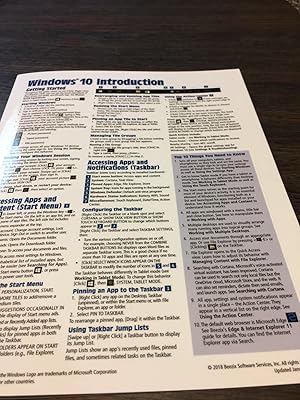
This Windows 10 Introduction Quick Reference Guide Cheat Sheet is a helpful resource for accomplishing certain tasks. The guide is laminated, making it durable, but some customers found the print to be small, blurry, and difficult to read due to glare. The most helpful aspect of the guide is its summary of shortcuts.
Customer Reviews & Ratings
1818 customers ratings
-
5 Star
63%
-
4 Star
19%
-
3 Star
12%
-
2 Star
4%
-
1 Star
2%
Review this product
Share your thoughts with other customers
Pros
- Helpful guide for accomplishing certain tasks
- Laminated for durability
Cons
- Small print
Product Price History
Important information
- Limitations : For products shipped internationally, please note that any manufacturer warranty may not be valid; manufacturer service options may not be available; product manuals, instructions, and safety warnings may not be in destination country languages; the products (and accompanying materials) may not be designed in accordance with destination country standards, specifications, and labeling requirements; and the products may not conform to destination country voltage and other electrical standards (requiring use of an adapter or converter if appropriate). The recipient is responsible for assuring that the product can be lawfully imported to the destination country. When ordering from Ubuy or its affiliates, the recipient is the importer of record and must comply with all laws and regulations of the destination country.
- Not all the products listed on Ubuy are for sale, as Ubuy is a global search engine. Products are subject to export/trade regulations.
BAM 25
Order now and get it around Wednesday, June 24
This item is not restrict in my country.(Please click on above link if this item is not restrict in your country, So our team will review and allow.)
QTY:
Only 4 items left in stock.
Secured transaction
Ubuy works hard to protect your security and privacy. Our advanced payment security system ensures confidentiality by encrypting your information during transmission using AES (Advanced Encryption Standards) and SSL (Secure Socket Layer) protocols. Your payment details are 100% secure as we do not share your payment details with third party sellers.
Our Top Logistics Partners
Fastest cross-border delivery
Features & Benefits
- Suitable as a training handout or reference guide
- Topics covered include starting Windows, managing content with file explorer, and working in tablet mode
- Includes a Top 10 Things You Need to Know list, keyboard shortcuts, and mouse/touch equivalents